The AI Homework Help App: How to Pick One That Teaches, Not Just Answers
Need help the moment you’re stuck, right from your phone? An AI homework help app lets you snap a photo of a tough problem and get a clear, step-by-step walkthrough, and recent survey data shows most teens have already tried something like it for schoolwork.
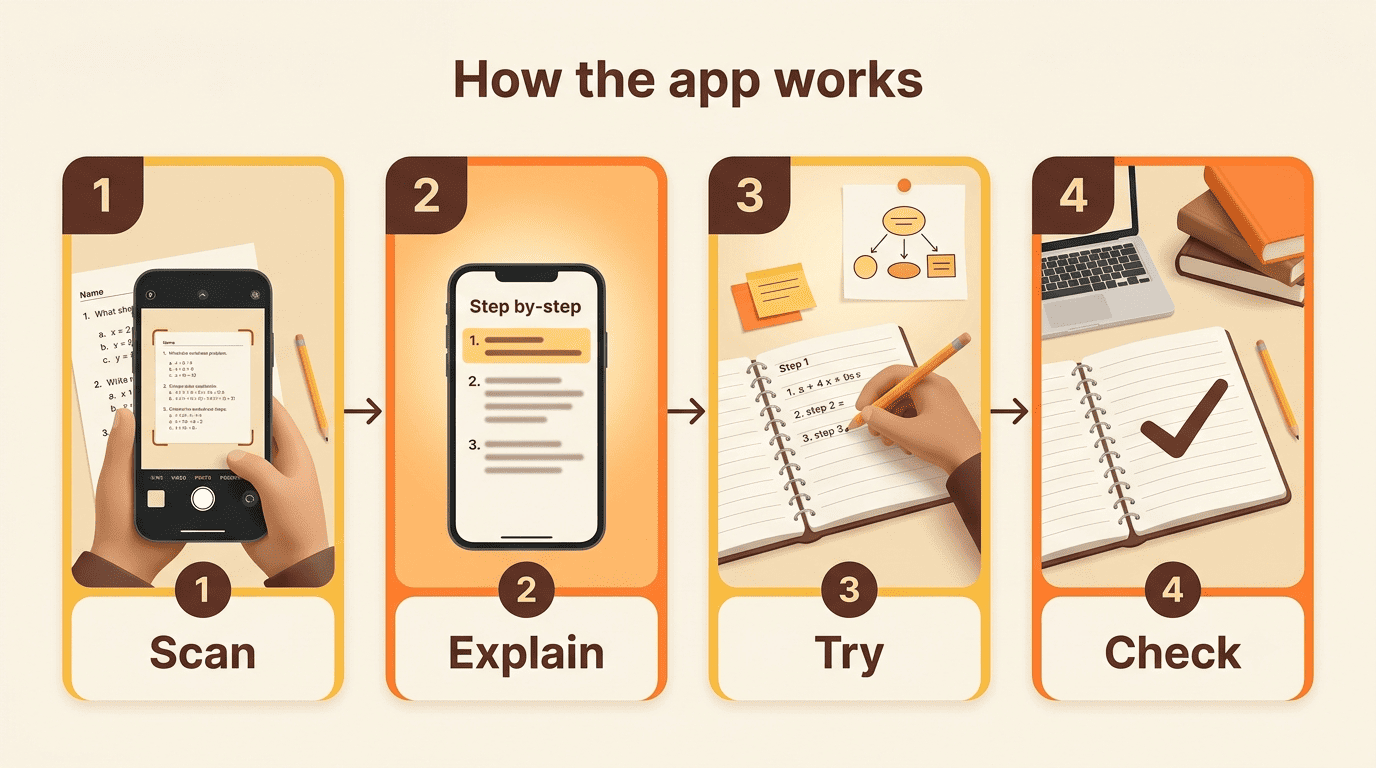
The trick is choosing one that actually builds understanding. Kai, the AI powered homework help assistant, is designed to explain the why behind each step and check your own work, so the app makes you a stronger student, not just a faster answer-copier.
What an AI Homework Help App Actually Does
A homework help app turns a confusing worksheet problem into something you can actually follow. You’re not looking things up in a textbook index anymore — you’re pointing a camera at the page and letting software do the reading for you.
Snap, solve, and understand
Point your camera at a printed or handwritten problem, and the app’s OCR (optical character recognition) technology recognizes and crops the question automatically. From there, an AI model returns a step-by-step explanation in seconds rather than a single bare answer. Modern homework scanner apps run on large language models — tools like StudyX, for example, are powered by a mix of models including GPT-4o, Claude 3.5, and Gemini 2.0. The best experience isn’t the fastest final number; it’s the explanation that shows you how the number was reached, so you could redo the problem on your own next time.
More than a calculator
Coverage has expanded well past math. Many AI homework helper apps now handle:
- Physics, chemistry, and biology problem sets
- Literature analysis and essay structure
- History and social studies questions
- Note summarizing and flashcard generation for exam review
The strongest apps let you ask a follow-up «why» question, the same way you’d nudge a tutor sitting next to you, instead of dead-ending on a single static answer.
Common Sense Media’s roundup of homework help apps flags the same trade-off repeatedly: these tools are useful references, but nearly every entry carries a «watch for cheating» caution — a reminder to treat them as a supplement to studying, not an easy solution.
Common Sense Media, Homework Help Apps
Subject coverage varies a lot between tools, so it helps to see the differences side by side before you commit to one.

Free vs. Paid: What a Homework Help App Costs
Pricing across this category follows a familiar pattern: enough is free to be genuinely useful, and the deeper features sit behind a subscription.
| App / model | Free tier | Paid tier | Platforms |
|---|---|---|---|
| Photomath | Basic scan + answer | Photomath Plus, $9.99/mo | iOS, Android |
| Socratic by Google | Fully free | — | Now built into Google Lens (iOS, Android, web) |
| Typical AI homework helper (e.g., Kai) | Scan + basic help free | Detailed step-by-step, ~$8-10/mo | iOS, Android, web |
The freemium model, explained
Scanning a problem and getting a basic answer is usually free across the category. The detailed step-by-step logic, the part that actually teaches you the method, more often sits behind a subscription in the $8 to $10 a month range. According to Wikipedia’s entry on Photomath, the math-scanning app is predominantly free, with a subscription-based «Photomath Plus» tier that adds deeper, textbook-specific explanations, and it runs on both iOS and Android. That Plus tier is priced at $9.99 a month, aimed mainly at students from around grade 6 through college. Socratic by Google, by contrast, is fully free across subjects — Google folded the standalone Socratic app into Google Lens in 2025, so that same free, all-subject homework help now lives inside Lens rather than a separate app. A handful of AI homework helpers also skip account creation entirely for casual, one-off use.
Is there a genuinely free homework help app?
Yes. Socratic by Google’s homework help costs nothing — it’s now part of Google Lens rather than a standalone app — and several AI-powered helpers offer free daily use before asking you to upgrade. Kai leans into that free-access, understanding-first approach — you can scan a problem and get a real explanation without hitting a paywall on the first question. What typically stays free versus what gets capped:
- Free almost everywhere: photo scan, basic answer, a limited number of daily questions
- Usually paid: unlimited detailed step-by-step breakdowns, saved history across sessions, textbook-specific solutions
- Varies by app: offline access, ad-free experience, priority response speed
The trade-off with any free tier is that advanced features like unlimited step-by-step breakdowns or saved history usually get capped until you subscribe.
How to Choose the Right Homework Help App
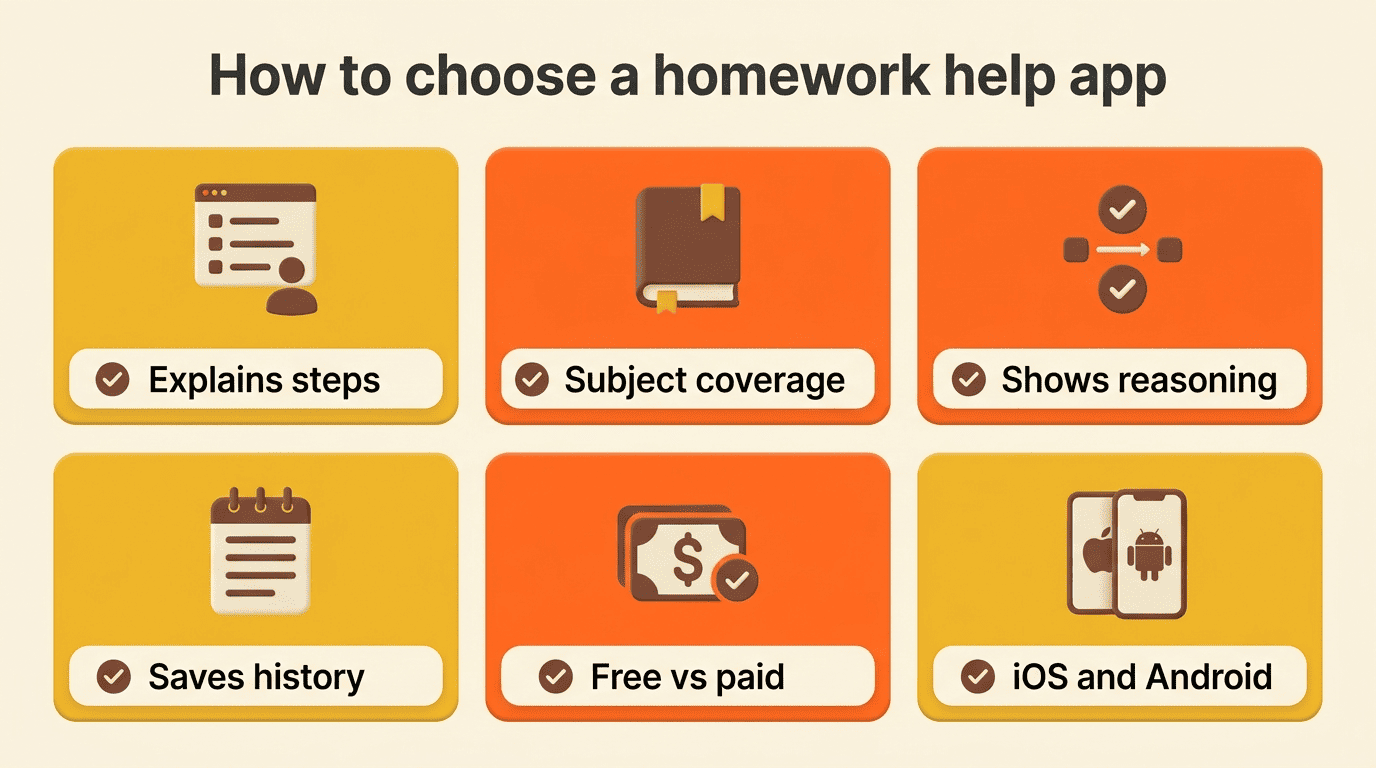
Picking a homework help app isn’t just about which one ranks highest in an app store. It comes down to how well it fits the subjects you’re struggling with and how you actually study.
A quick checklist before you download
- Check whether it explains steps or just spits out a final answer.
- Match subject coverage to what you actually need help with.
- Look for accuracy you can verify — does it show reasoning, not just a result?
- Confirm it saves history so you can review problems before a test.
- Compare the free tier against the paid price (~$8-10/month is typical).
- Check platform availability — iOS, Android, or web.
Photomath is generally the strongest pick if your workload is math-heavy, thanks to OCR tuned specifically for equations and handwritten notation. Socratic’s free, all-subject homework help — now built into Google Lens — is the better call if you want broad coverage without a subscription.
| Subject strength | Photomath | Socratic (now Google Lens) | Broad AI homework helper (e.g., Kai) |
|---|---|---|---|
| Math (equations, word problems) | Strongest OCR | Good | Good |
| Science (physics, chemistry, biology) | Limited | Good | Good |
| Literature / essays | Not covered | Some | Good |
| History / social studies | Not covered | Some | Good |
| Cost to unlock full explanations | $9.99/mo | Free | ~$8-10/mo |
Match the app to how you study
Heavy math load. If most of your homework is algebra, calculus, or geometry, prioritize AI math homework help with a strong OCR math solver that handles handwriting and printed equations equally well.
Mixed subjects. Students juggling science, literature, and history at once tend to do better with a broad AI homework helper that isn’t specialized in just one area.
Exam cramming. If you’re studying for a test rather than finishing tonight’s assignment, look for saved history and a quiz mode so you can revisit problems you got wrong the first time.
Are Homework Help Apps Cheating?
This is the question every parent, teacher, and student eventually asks, and the honest answer is: it depends entirely on how the app gets used. A few quick signs you’re on the right side of that line:
- You read the explanation before writing anything down
- You can redo a similar problem afterward without looking
- You use it to check work you already attempted, not to skip the attempt
- You follow your teacher’s stated policy on AI tools for that assignment
Where the line sits
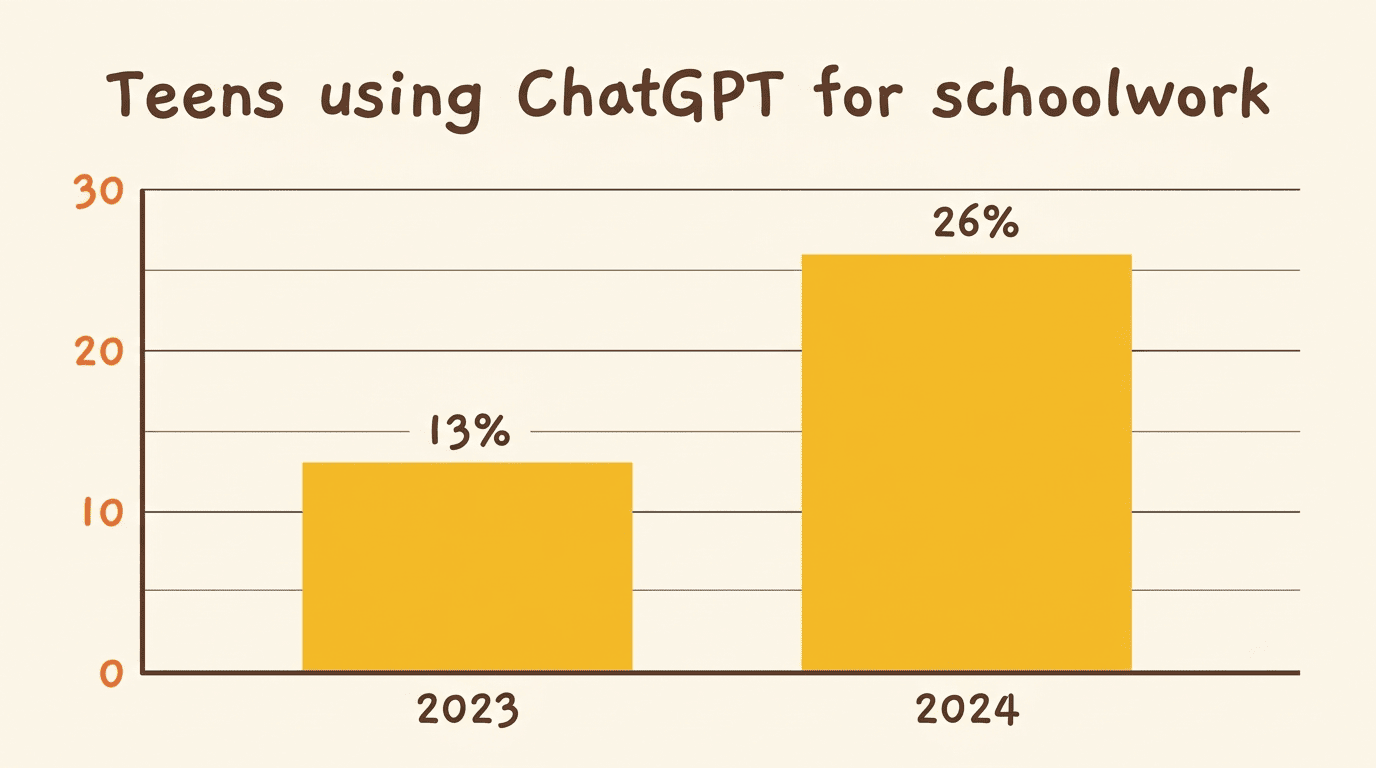
An app that explains a concept and lets you check your own work is a study aid. An app you use to copy answers straight onto a worksheet without reading the explanation is not. According to Pew Research Center’s February 2026 report on how teens use and view AI, 54% of U.S. teens say they’ve used a chatbot for help with schoolwork, and about 6 in 10 think AI chatbots are used to cheat at their school at least sometimes. A separate Pew analysis found the share who’ve specifically used ChatGPT for schoolwork climbed to 26% in 2024, up from just 13% the year before — so the adoption curve and the concern curve are rising together. The UNESCO guidance on generative AI in education takes a similar stance, framing these tools as something meant to support human learning capability, not replace it. Whatever app you choose, always check your teacher’s specific policy on AI use before you submit anything.
How Kai keeps it honest
Kai is built to explain-and-check rather than ghost-write your homework. It walks through the reasoning behind each step and then asks you to attempt the next part yourself, so by the time a test rolls around, you actually own the material instead of just recognizing the app’s old answers.
Getting Started With a Homework Help App
Getting from a blank app icon to your first solved problem takes just a few minutes.
From download to first solved problem
- Install a homework help app from the App Store or Google Play, or open the web version if you’re on a laptop.
- Snap a photo of your first tricky problem, or type it in if it’s easier.
- Read through the full step-by-step explanation instead of skipping straight to the final line.
- Try a similar problem on your own to confirm the method actually clicked.
- Ask a follow-up «why» question if any step still feels shaky.
- Save the toughest problems so you can revisit them before a test.
Building that habit, asking «why» instead of just copying, is what separates a study tool from a shortcut. Availability around the clock means you’re never stuck waiting until office hours or a scheduled tutoring session to get unstuck.